

XA Transactions (2 Phase Commit): A Simple Guide
Explaining the details of XA transactions and use of XA Transactions in Spring framework.
Join the DZone community and get the full member experience.
Join For FreeIn the early days of computing, there was no need for distributed transactions. As number of applications increased, synchronization of the data become an important issue. Companies paid a lot to maintain synchronized systems in terms of data flow. As a result, the 2 phase commit protocol referred to as XA(eXtended Architecture) arose. This protocol provides ACID-like properties for global transaction processing. Throughout this article, I will try to explain details of XA transactions and use of XA Transactions in Spring framework.
2 phase commit protocol is an atomic commitment protocol for distributed systems. This protocol as its name implies consists of two phases. The first one is commit-request phase in which transaction manager coordinates all of the transaction resources to commit or abort. In the commit-phase, transaction manager decides to finalize operation by committing or aborting according to the votes of the each transaction resource. We will next move on to implementation details of 2PC protocol.
*See here for resources on Java + .NET Interoperability through 2PC.
XA transactions need a global transaction id and local transaction id(xid) for each XA resource. Each XA Resource is enlisted to XA Manager by start(xid) method. This method tells that XA Resource is being involved in the transaction(be ready for operations). After that, the first phase of the 2PC protocol is realized by calling prepare(xid) method. This method requests OK or ABORT vote from XA Resource. After receiving vote from each of XA Resource, XA Manager decides to execute a commit(xid) operation if all XA Resources send OK or decides to execute a rollback(xid) if an XA Resource sends ABORT. Finally, the end(xid) method is called for each of XA Resource telling that the transaction is completed. Look at the figure to understand better. As we build a background in XA transaction implementation, we will next go deeper and see types of failures and possible solutions.
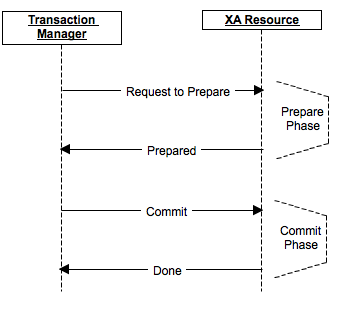
Failures can occur at any time due to network loss, machine down and some administrator mistake. In XA transaction, we will categorize these failures according to the phases that they occur. The first failure phase is before protocol is started. This is a simple failure that system does need not to rollback or any kind of operation. We just do not do the operation for that particular moment. Second type of failure can occur at prepare(commit-request) phase which can be easily handled by rollbacks using timeout policies. Last but not the least is commit phase failures which can occur due to incomplete rollbacks and any problem in chain. In all of these above situation, transaction manager tries to recover the problem. We will next see how transaction manager tries to overcome failures.
For recovery, transaction manager calls recover method of each XA resource. XA Resources trace the logs and tries to rebuild its latest condition. Transaction Manager calls necessary rollback operations and mission is accomplished. This process can seem to be happy path but there are a lot of exceptional situations where logs are problematic like being corrupted. In these kinds of situations, transaction manager follows some heuristics to solve the problem. Moreover, the recovery process depends on the write-ahead logs where you write operation logs before applying. For performance issues these logs are written in their own format(not using any serialization) and system should better batch them if possible. We next go to fun part which is XA transaction support by Spring framework.
Spring framework provides extensive environment to develop web and stand alone applications. Like other utilities it provides, XA transactions are also supported by Spring. However, this support is not a native implementation and requires hibernate, web container or a framework that provides XA Transaction Management. Spring has JtaTransactionManager that provides transaction management utilities and hides the details. By this way, we can have transaction management for multiple DataSources which are updated simultaneously. When it comes to use XA Transaction Management, hibernate and web containers support for XA transactions are well documented, do not need to be mentioned. However, working with a framework that provides XA transactions can be confusing. Thus, I will continue this post by introducing Bitronix Transaction Manager.
Bitronix is easily configured while providing good support for transaction management. It is not commonly used in stand alone applications but I will try to give configuration for stand-alone application as follows.
|
We can now have multiple data sources which can be configured as follows. Each data source should have a uniqueName property which is unique. Below configuration is for Oracle, other databases can have different configurations. For any other detail, you can check Bitronix website.
|
To sum up, we have tried to explain what is XA Transactions, underlying protocols and Bitronix Transaction Management integration with Spring in a stand alone application. To extend, XA Transactions provides modifying different data sources at the same time. Furthermore, XA Transactions are supported by web containers or hibernate like frameworks. Nevertheless, we may need to integrate transaction management to a stand alone application in which we must configure transaction manager. In consequence, XA transaction provides consistent operations on multiple data sources and companies make use of them.
*Curator's notes and additional resources
Published at DZone with permission of Yusuf Aytaş, DZone MVB. See the original article here.
Opinions expressed by DZone contributors are their own.
Comments