

Suppressing FindBugs Warnings
By
 ·
·
Interview
·
·
Interview
Likes
(0)
Likes
There are no likes...yet! 👀
Be the first to like this post!
It looks like you're not logged in.
Sign in to see who liked this post!
Comment
Save
31.2K Views
Join the DZone community and get the full member experience.
Join For FreeA few days ago I spoke with my friend, Tomek, about suppressing FindBugs warnings. Here is brief summary of our conversation, which may be interesting for you.
There is one simple method for suppressing the FindBugs warnings - usage of edu.umd.cs.findbugs.annotations.SuppressWarnings annotation. Just add it in the place where FindBugs reported problem, and use the appropriate bug code.
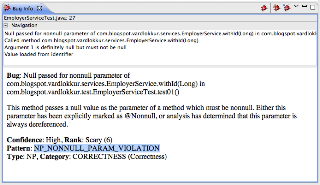
You should start by adding com.google.code.findbugs:annotations:2.0.0 jar to the project dependencies. Then open the bug reported by FindBugs, and find its code, like in this example:
Finally add something like this to the method holding the code marked by FindBugs:

That's all, clear the FindBugs markers, and run it again, the problem will not be reported in this place again.
Nice! Isn't it? - No, it isn't :( - Why you may ask? - Because there is another annotation in java.lang package with exactly the same name (!), used for suppressing different kind of warnings. Shouldn't it be used instead? - Well ...
Another question is if we want to add another jar to the project dependencies just for suppressing FindBugs warnings - thank God the FindBugs authors marked this annotation with retention policy 'CLASS', which means the jar will not be required when running the project (ex. in web application container).
There is one simple method for suppressing the FindBugs warnings - usage of edu.umd.cs.findbugs.annotations.SuppressWarnings annotation. Just add it in the place where FindBugs reported problem, and use the appropriate bug code.
You should start by adding com.google.code.findbugs:annotations:2.0.0 jar to the project dependencies. Then open the bug reported by FindBugs, and find its code, like in this example:


Nice! Isn't it? - No, it isn't :( - Why you may ask? - Because there is another annotation in java.lang package with exactly the same name (!), used for suppressing different kind of warnings. Shouldn't it be used instead? - Well ...
Another question is if we want to add another jar to the project dependencies just for suppressing FindBugs warnings - thank God the FindBugs authors marked this annotation with retention policy 'CLASS', which means the jar will not be required when running the project (ex. in web application container).
FindBugs
Published at DZone with permission of Michal Jastak, DZone MVB. See the original article here.
Opinions expressed by DZone contributors are their own.
Comments